Running effective virtual brainstorming sessions
Mastering this skill is a key part of the remote-hybrid PM toolkit

Brainstorming sessions can serve as an amazing tool to generate creative ideas, create new value for customers, and improve the trajectory of your business. Yet, running an effective brainstorm especially in a location-distributed environment, can feel daunting.
Even prior to the pandemic, it was common for me to join a meeting from my office in San Francisco with a distributed team, as we had offices and team members in multiple cities around the world. During the height of the pandemic, we honed these skills as everyone became remote. As of this year, many teams have returned to a hybrid or fully remote environment, and running effective virtual brainstorming sessions is a crucial part of the new PM toolkit.
Now that I run my own independent consultancy with clients whose teams are geographically distributed, I frequently facilitate virtual brainstorming sessions.
Below I share tips and tools that I use to run these sessions, which can be applied to both in-person and virtual brainstorms.
Pre-work
A brainstorm is an expensive meeting: getting 1-2 hours of your dev team, key partners and stakeholders into a session together, on aggregate, is about 10-15 hours or more of your organization’s collective time. By doing some pre-work, you can ensure this time is used valuably.
Tip #1: Have a clear problem statement & outcome
It is important to have a focus area for your brainstorm so participants are clear on the problem we are trying to solve. Examples of brainstorm prompts include:
How do we improve our product onboarding so customers get value faster?
What are ways in which we can generate more subscriptions?
How do we increase customer satisfaction and retention?
It helps to pair these problem statements with measurable outcomes to guide the brainstorm. For the prompts suggested above, successful outcomes might be:
Double the number of customers who complete a value add action in our product on day 1
Get 1000 new paid subscribers
Double our week/week in-product customer retention
For the rest of this article, we’ll use the problem statement of improving customer satisfaction and retention as an example.
Tip #2: Invite a mix of stakeholders (but cap at 10)
People across your organization have exposure to different sets of data and customer interactions, which can result in unique perspectives.
For example, for improving customer satisfaction and retention with your product, it can be helpful to invite customer operations, marketing, data team members who have insight into real-time customer issues, branding, data insights, to join the brainstorm in addition to your core dev team.
If you limit your brainstorm audience to just one group or function, you suffer from missing out on creative ideas that come from bringing differing perspectives together.
However, there is something as too many cooks, so I usually try limit the participant list to max of 10-12 folks across different functions.
Tip #3: Send contextual information in advance (pre-read)
Every function is an expert in their specific area, but lacks a view of the overall picture. Engineering might be aware of bugs in the product, operations may have insight into how specific customer feedback, data analysts might be experts in which points of the product journey result in customers dropping off- bringing this information together in one place can help provide a summary context to everyone on the problem you’re trying to solve.
Pull together a few slides sharing verbatim customer quotes, their struggles using your product, metrics on current satisfaction and retention, comparisons to other alternative products that customers may have churned to, and other relevant information.
Sending out a pre-read to the participants 48 hours before the brainstorm can help those who like to advance prep have time to digest the information and contribute more effectively.
During the session
Tip #4: Start with intros and setting context
Brainstorms bring together people from different orgs who may never have met each other e.g. your marketing manager may not know the engineers on your team. Kicking off with a quick round of intros can help everyone get acquainted.
Despite sending out pre-reads, people are busy and may not have time to read or prepare in advance. It helps to review the brainstorm prompt, what a successful outcome looks like, and the contextual information you collected to create a shared understanding of the problem. This also enables participants to share any additional insights that can improve our understanding of the problem statement.
Tip #5: Create a structure for generating ideas
A problem statement like increasing customer retention can feel large and ambiguous. It helps to break down big problem statements into levers and run idea generation exercises for each lever separately.
For example, levers to increase customer satisfaction and retention might be:
Improve the value of current product features
Launch new product features that provide value
Improve customer onboarding, education or support
etc
You can come up with a list of levers prior to the brainstorm, and also get ideas for levers that are worth exploring during the brainstorm.
The next step is to run idea generation exercises for each lever.
Tip #6: Use virtual breakouts and virtual whiteboards
For idea generation in groups larger than 4 people, use the breakouts feature in Zoom to create small breakout groups of 2-3 people to brainstorm ideas for each lever. Smaller groups encourage people to participate and provide airtime for everyone to share their ideas. Ask each group to designate a note-taker. In real life, groups can disperse to different corners of a large meeting room or different parts of the office.
Once the breakout session is complete, the groups return to the main meeting room and the note-takers will share out the ideas generated during the breakout session.
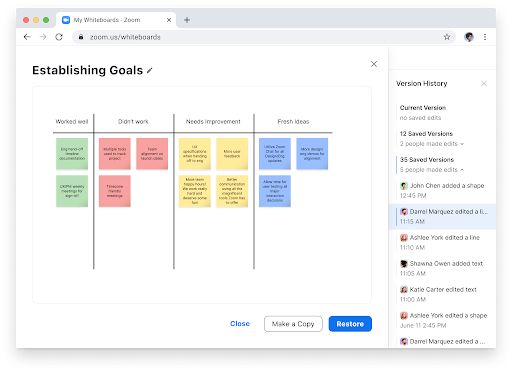
As the facilitator, use a virtual white boarding tool like FigJam or Zoom whiteboard (or a real whiteboard IRL) to group together ideas by theme as they are being shared by note-takers. This helps folks in the brainstorm session follow along with the discussion.
Tip #7: Take a break and organize ideas
After your breakout sessions to collect ideas for different levers, take a break! By now you’ve probably spent an hour or so already brainstorming and giving participants a break can help them have a breather (or just go to the bathroom).
During the break, it helps if you as the facilitator can continue to group ideas by key themes across the different levers. When the rest of the group returns from break, you can share out the ideas generated grouped under themes.
Tip #8: Play a prioritization game
This is an optional step and by no means the main way to do prioritization. But getting the popular vote can be helpful as one indicator of which ideas team members think will have the biggest impact. It can be used as an input into prioritization, alongside data analysis and real customer feedback.
To run this prioritization game, I like to use a method I learned from ex-VP of Product at LinkedIn (and now CPO at Atlassian) Joff Redfern. It’s called the $10 game.
The idea is that you give each participant $10 and ask them to invest it in $1-2 increments on the ideas generated to reach the end goal e.g. increasing customer satisfaction and retention. Discourage people from making too many $1 investments (spreading too thin) by giving them an upper bound of # of investments they can make e.g. max 3 investments per person. You can use Google or Airtable forms to have people privately submit their allocation. Tabulate the results and share which ideas were deemed most investment-worthy by the group.
Tip #9: Share your next steps
By now you have done all the hard work of running this brainstorm, so don’t leave this last crucial step out! Share your process of what you will be doing with the list of ideas generated and how they will impact your roadmap with participants. This helps them understand their time was well spent.
Most often, brainstorms are scheduled in advance of quarterly or annual planning or when we are trying to address a specific customer or business challenge within a certain timeframe. All of these are time-bound, which means you can share a timeline with the team on when you’ll be following up.
After the session
Tip #10: Follow up
This last piece is just about seeing through what you communicated to the team in Step #9. In practice, I’ve seen a huge drop off between steps #9 and #10, as PMs get sucked into different directions and competing priorities for their time. Following up on which ideas the team will be investing in and why, can help close the loop on an effective brainstorm session, and incentivize folks to participate in future sessions.